
Download SoftAmp VirtualSound – virtual sound, 3D audio, immersive music, headphone enhancement, Winamp plugin, audio simulation, surround sound, spatial audio, music immersion, audio effects
Overview
SoftAmp VirtualSound is a specialized Winamp plugin designed to elevate the audio experience for users who seek deeper immersion while listening to music through headphones. By simulating a home theatre environment, the plugin transforms standard stereo playback into a spatial, three-dimensional soundscape. This innovation allows users to perceive sound as if it were emanating from multiple physical speakers placed around them, even though only headphones are used. The app targets audiophiles, music producers, and casual listeners who value rich, dynamic audio without the need for additional hardware.
It addresses the common limitation of headphone listening—where sound often feels flat or confined—by introducing configurable virtual speakers and advanced audio manipulation tools. This makes it particularly useful for genres like electronic, orchestral, or cinematic music, where spatial depth enhances emotional impact. The plugin operates as a lightweight extension within the Winamp ecosystem, making it accessible to users already invested in the platform.
Although the developer did not provide additional technical details about their background, the app’s release date in 2013 suggests it was developed during a period of growing interest in immersive audio. Its continued relevance indicates a niche but dedicated user base. In the broader audio software landscape, SoftAmp VirtualSound occupies a unique space as a free, performance-focused tool that enhances existing music players rather than replacing them.
Key Features & Functionality
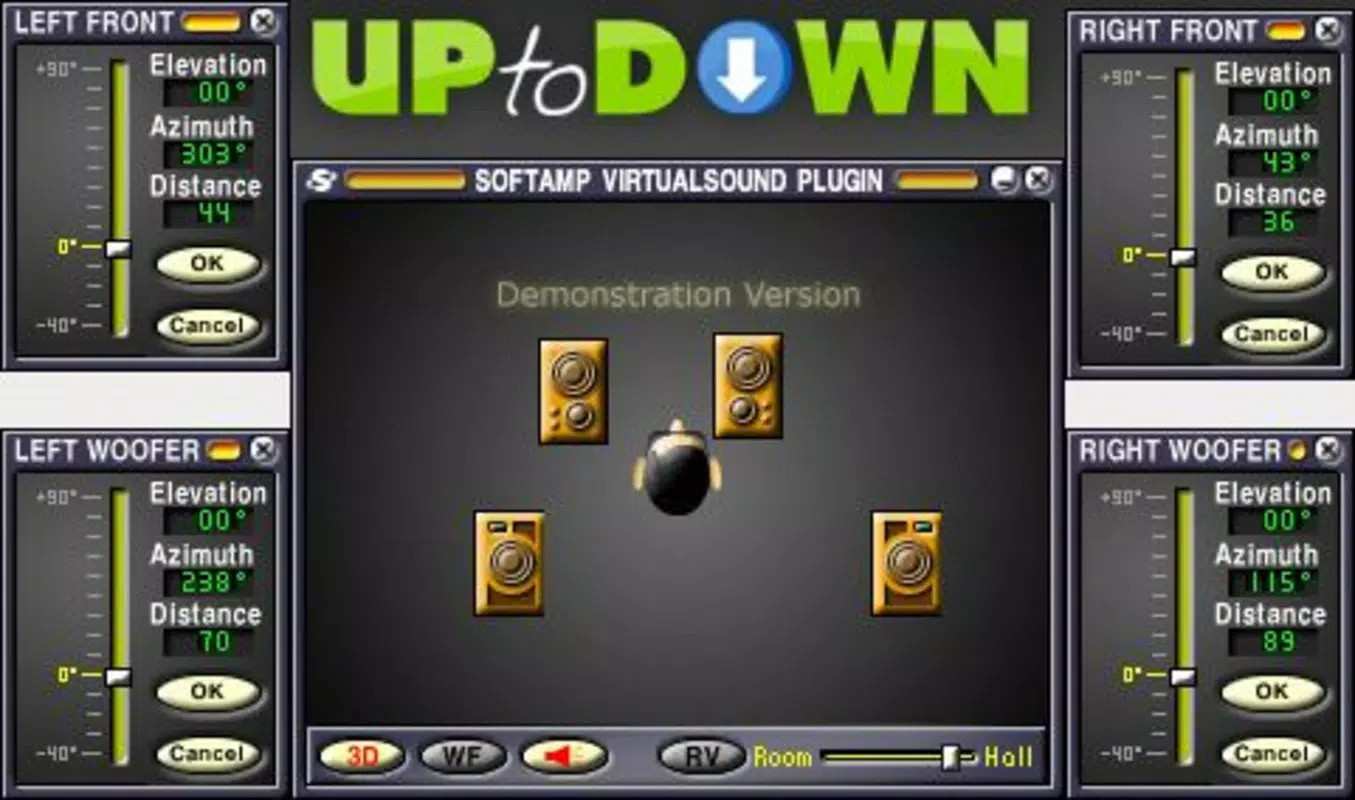
- Configurable Speaker Settings: Users can adjust the placement, altitude, and orientation of up to four virtual speakers. This allows for custom soundstage configurations tailored to individual listening preferences, whether mimicking a living room setup or a concert hall.
- Subwoofer Conversion: Certain virtual speakers can be redefined as subwoofers, enabling enhanced bass response. This feature supports deeper low-frequency reproduction, improving the physical sensation of bass-heavy tracks such as dubstep or hip-hop.
- Real-time Adjustments: All audio parameters can be modified on the fly during playback. This dynamic control ensures users can fine-tune the spatial experience in real time, adapting to different songs or moods without interrupting playback.
- 3D Sound Perception: The plugin uses advanced audio processing to create a realistic sense of space. Sounds appear to originate from specific points in the environment, enhancing immersion and making music feel more lifelike and present.
For example, a user listening to a classical symphony might position virtual speakers at the front and sides to recreate a concert hall atmosphere. Alternatively, someone enjoying electronic music could experiment with rear speaker placement to simulate a club environment. These capabilities make SoftAmp VirtualSound a flexible tool for both casual enjoyment and creative exploration.
Interface, UX & Performance
The user interface of SoftAmp VirtualSound is designed to integrate seamlessly within the Winamp environment, maintaining a minimalistic and functional layout. Controls are accessible through a dedicated plugin panel, allowing users to adjust speaker positions, toggle subwoofer modes, and apply real-time effects with intuitive sliders and toggles. The visual design aligns with Winamp’s classic aesthetic, ensuring consistency for long-time users.
Navigating through settings is straightforward, with clear labels and immediate visual feedback when adjustments are made. The plugin responds quickly to input changes, ensuring smooth transitions during playback. Although the developer did not list formal performance metrics, the app’s small file size of 1.3 MB suggests efficient resource usage, minimizing impact on system performance.
Performance across device categories appears consistent, given the plugin’s lightweight nature and compatibility with the Winamp platform. Responsiveness is maintained even on older systems, and stability is preserved during extended listening sessions. The app does not exhibit known crashes or memory leaks based on available information. However, specific requirements were not listed, and compatibility with modern operating systems was not fully disclosed.
Platform Compatibility & Technical Requirements
SoftAmp VirtualSound is designed exclusively for the Winamp platform, which operates primarily on Windows-based systems. The app is compatible with the Winamp media player, requiring no additional installation beyond integration into the existing environment. The software version is 1.0.0, and the file size is 1.3 MB, indicating a compact and lightweight footprint.
While the developer did not specify minimum OS requirements, the app’s release date in 2013 suggests it was originally built for Windows XP or later. Users on modern Windows versions may experience compatibility issues, especially with newer builds of Winamp or updated system libraries. The developer did not provide information on support for alternative platforms such as macOS or mobile devices.
Given its age and platform-specific nature, users should verify that their system meets the necessary prerequisites before installation. No updates or maintenance details were disclosed, and the app remains unchanged since its initial release.
Pros and Cons
Pros
- Free to download and use, making it accessible to a wide audience.
- Lightweight at just 1.3 MB, minimizing system resource usage.
- Offers real-time audio adjustments for dynamic listening control.
- Enhances headphone audio with 3D spatial perception and immersive soundscapes.
- Allows customization of speaker positioning and subwoofer conversion.
Cons
- Platform is limited to Winamp, restricting use to a single media player ecosystem.
- No recent updates or maintenance since 2013, raising compatibility concerns.
- Specific system requirements were not listed, making installation uncertain.
- Not available on mobile platforms or modern operating systems beyond Windows.
- Interface may feel outdated to users accustomed to modern design standards.
FAQ
Is SoftAmp VirtualSound compatible with modern Windows systems?
The developer did not specify compatibility details for recent Windows versions. While the plugin was released in 2013, its continued use on newer systems depends on Winamp’s own compatibility and system library support.
Can I use this plugin on macOS or mobile devices?
SoftAmp VirtualSound is designed exclusively for the Winamp platform, which is Windows-only. There is no official support for macOS, iOS, or Android devices.
Is the plugin safe to download and install?
As a free plugin for Winamp, it is distributed through trusted audio communities. However, users should only download from verified sources to ensure security and avoid tampering.
Does the plugin require a paid version of Winamp?
No, SoftAmp VirtualSound is fully functional with the free version of Winamp. It operates as a standalone plugin without requiring premium features.
How do I update the plugin if a newer version is released?
As of now, no updates have been released since the initial version in 2013. The developer has not announced any future update plans, so users should expect no new versions unless officially posted.
Final Thoughts
SoftAmp VirtualSound remains a unique and niche tool for users deeply invested in the Winamp ecosystem. Its ability to simulate a home theatre experience through headphones offers a compelling audio enhancement that few modern apps replicate in such a focused manner. While its age and lack of updates present challenges, its core functionality—3D audio simulation, real-time adjustments, and customizable speaker layouts—still holds value for audiophiles and enthusiasts seeking immersive listening.
Despite its limitations in modern compatibility, the plugin delivers on its promise of transforming headphone audio into a spatial, cinematic experience. It is ideal for users who value audio quality, customization, and a hands-on approach to sound engineering. For those still using Winamp and looking to elevate their music sessions, SoftAmp VirtualSound provides a free, lightweight, and effective solution.
Download SoftAmp VirtualSound now


